Update Post - Mid June 2026
Hello again! Today, I'm announcing a couple of updates to PYTHIA!
- The first is a revamp to the messaging system, allowing you to separated sent messages into threads and also allowing users to send images and videos.
- More systems now allow you to export and import items, allowing you to easily transfer items between servers or keep backups of your items.
- Finally, a few extra changes have been done for convenience.
Messaging Systems Revamps
Messaging Modes
The messaging system now has three modes for how messages are sent to users:
- Classic: This is the original messaging mode, where messages are sent directly to the linked channel for a user. This mode does not use threads, and all messages for a user will be sent to the same channel.
- Public Thread Per User: In this mode, a new thread will be created in the linked channel for a user when they receive their first message. All messages for that user will be sent to that thread. This is the new default mode for the messaging system.
- Private Thread Per User: This mode is similar to the "Public Thread Per User" mode, but the thread created for a user will be private, and only the user and staff members will be able to see the thread and the messages in it.
Confusing? Here's an example of what the difference is between "Classic" and "Public Thread Per User" in the channel view when @astrea.tss sends a message to @hecatetss:
- Classic

- Public Thread Per User
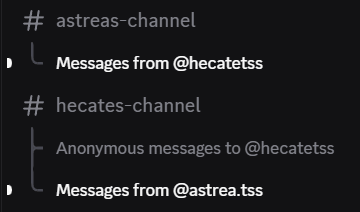
More information can be found in the modes section of the Messaging Setup Guide.
Default Mode Setting
For servers that had PYTHIA before June 18th, 2026 and used the messaging system, the mode will be set to "Classic" by default unless it is changed. However, for servers that did not have PYTHIA before this date, the mode will be set to "Public Thread Per User" by default.
Sending Images and Videos
Users can now send images and videos through the messaging system!
When sending a message, a pop-up will appear allowing you to type your message and add an image or video to the message.
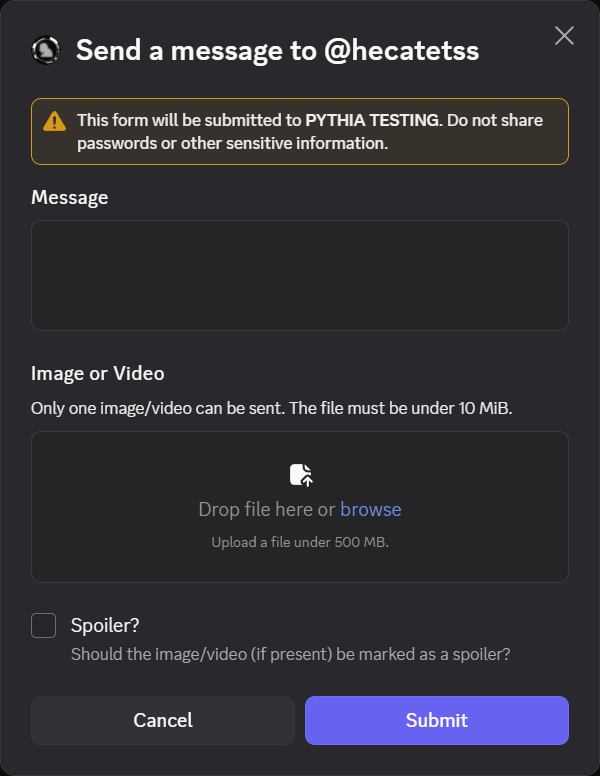
Don't Want to Use the Pop-Up?
If you don't want to use the pop-up, you can supply the message option directly into /message send.
The text/prefixed variant of the command, @BOTMENTION message send @USER <message>, also allows you to attach multiple files to a message, which the pop-up does not support.
More information can be found in the Messaging Guide.
Exporting/Importing Items for More Systems
More systems now support exporting and importing items! This includes:
- The Items System
- Staff for the Dice System
- Channels for the Truth Bullet System
This expands upon the existing exporting the importing functionality that already existed for:
- The Gacha System
- Normal users for the Dice System
Other Changes
/bullet-manage moveallows you to move a Truth Bullet from one channel to another./gacha-manage transfer-itemallows you to transfer an item from one player to another.- Aliases for Truth Bullets can now be up to 60 characters long, up from 40.